CH Digital insights
Electrician websites: examples, costs and what to include
A guide for UK electricians who want a professional website that builds trust, explains services clearly and turns visitors into calls and quote requests.

A useful electrician website explains the services you actually offer, the areas you cover and how to contact you. It backs those claims with genuine qualifications, work photographs and reviews. On a phone, visitors should be able to choose the right service and call or enquire without hunting through menus.
This guide covers a practical mobile layout, scope-based costs, a service-page checklist and three worked enquiry journeys. If you want help with a build or redesign, see our electrician website design service.
An annotated electrician website example
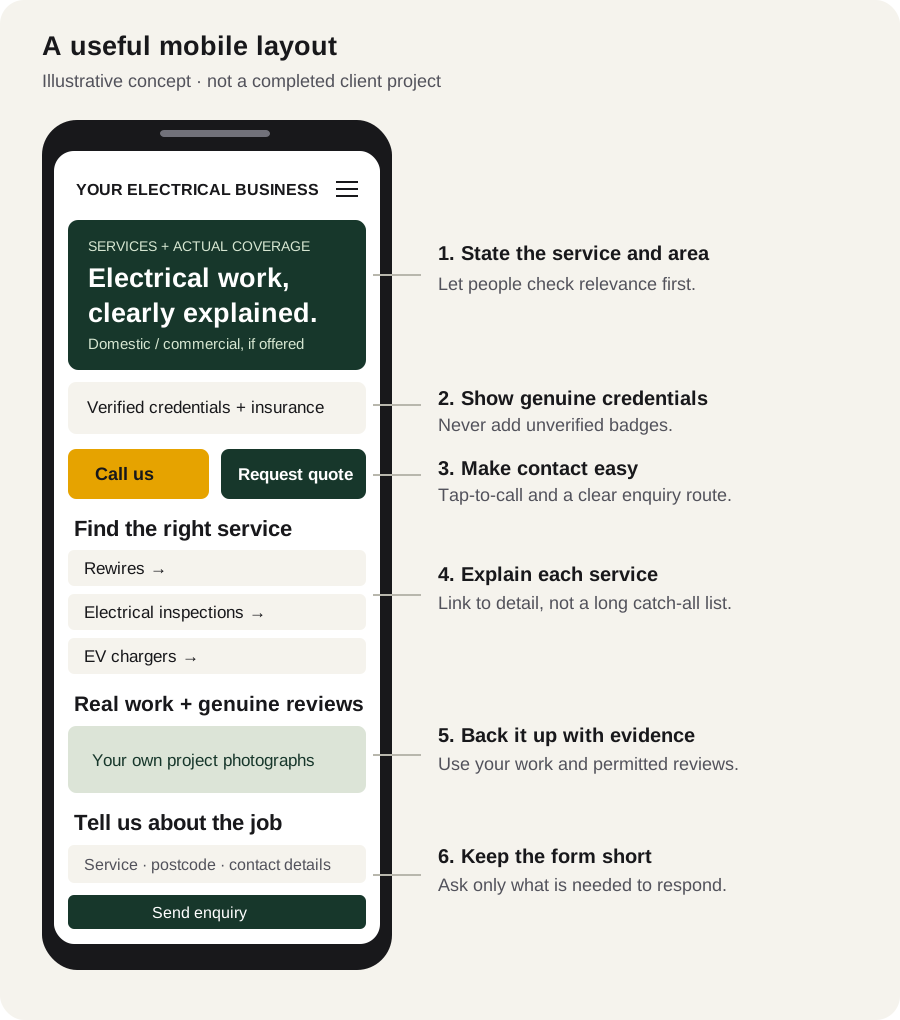
- Say what you do and where. A headline such as “Domestic electrical services in [your actual area]” lets a customer check relevance. Only advertise emergency cover or a response time you genuinely provide.
- Make trust checkable. Show current registrations and insurance accurately. Link to a genuine register entry where appropriate. Registration schemes and building regulations differ across the UK; do not add an accreditation logo just because other electricians use it.
- Offer a clear next step. Use a tap-to-call link for telephone enquiries and a short form for work that needs details or photographs. Explain when customers can expect a response only if that commitment is supported.
- Separate important services. A homeowner considering a rewire needs different information from a landlord arranging an inspection. Each service page should explain the work, coverage and what is needed for a quote.
- Show your own evidence. Use permissioned reviews and actual project photographs. Do not substitute stock imagery for a claim about completed work.
- Keep enquiries manageable. Ask for the job type, postcode, description and contact details. Extra information can follow once you know the work is a fit.
Real CH Digital work with relevant design lessons
We are not presenting a general construction project as an electrician website. Our NI Timberframes case study shows how facility imagery, project information and a contact route can support a trade business. The Apollo Solar case study shows a sector-led structure and assessment enquiries for a renewable energy company. These are examples of related website decisions, not evidence of electrician-specific results.
What should an electrician website cost?
There is no single price for every electrical business. CH Digital currently scopes projects in a written proposal rather than publishing a universal electrician package. The number of distinct pages, content work, existing-site migration and any integrations change the quote. A quote should separate the build from ongoing service so you can compare like for like.
Illustrative scope A: a focused local enquiry website
A small domestic contractor might need a homepage, a services overview, an about page and contact details, with separate detail for its most important service. The brief should specify who supplies text and photographs, which areas are genuinely covered, the number of revision rounds, and whether hosting and ongoing changes are included. This is an example of a brief, not a fixed-price plan.
Illustrative scope B: a multi-service contractor website
A contractor offering rewires, inspections, EV chargers and commercial work may need dedicated service pages, a project gallery and a more detailed enquiry form. Reusing existing useful content is different from writing it from scratch. Booking software, job-management integrations, content migration and extra location pages need their own scope; they are not automatically included because the site has more pages.
Compare the build and running costs separately
- Design and build: agreed pages, layouts, revisions, forms and launch work.
- Content: what you provide, what needs writing and any photography or licensed assets.
- Hosting and support: hosting, SSL, maintenance responsibilities, support hours and included update allowance.
- Extras: domains, email hosting, third-party software and new functionality.
- Commercial terms: payment milestones or monthly fees, minimum term, cancellation and handover arrangements.
The published terms specify a 12-month minimum for eligible published monthly plans unless the checkout or written agreement says otherwise. Ownership of paid custom work and end-of-plan handover are addressed separately. Read the current terms and your proposal rather than assuming every engagement has the same arrangement. Our fixed-fee versus monthly cost guide explains how to compare total costs.
Three worked enquiry journeys
A homeowner planning a rewire
Start with a rewiring page that describes the types of work offered, actual coverage and the information needed to discuss the job. Show relevant work with permission. The enquiry form can request property type, postcode and a short outline; do not suggest a definitive electrical specification or price without understanding the property.
A landlord arranging an EICR
Explain the inspection service, who it is suitable for and how to arrange it. Ask for the property location, type and access requirements. Describe qualifications and reports accurately for the jurisdiction and the business; a website should not invent a compliance guarantee.
A customer considering an EV charger
Explain the installation service and the information the electrician needs before recommending a setup. A short form can capture the postcode, parking arrangement and contact details. Avoid presenting compatibility, grant eligibility or a fixed installation price as confirmed before assessment.
A homepage and service-page checklist
- One clear headline covering the real service and area.
- Current, verifiable qualifications and business details.
- Readable mobile navigation and a usable phone link.
- A page for each important service actually offered.
- Genuine work examples and permissioned customer feedback.
- A short, accessible form with clear success and error messages.
- Accurate page titles, canonicals and descriptive internal links.
- Working enquiry delivery, not just a form that appears to submit.
- Consent-aware measurement for enquiries and phone clicks.
Measure genuine form enquiries and useful calls rather than treating page views as sales. Test forms with agreed test data and check the destination inbox before launch. Do not promise rankings or a lead volume based only on a redesign.
Common questions
What should an electrician website include?
Actual services and coverage, verified credentials, genuine work examples, clear contact details and a short enquiry route. Dedicated service pages are useful when they answer distinct customer questions.
Can CH Digital build or improve an electrician website?
Yes. We can scope a new website or improvements to an existing one, with pages, content, hosting and support confirmed in a written proposal.
Is every accreditation suitable for every electrician?
No. Display only current credentials held by that business and appropriate to its work and jurisdiction. Check permission to use any scheme logos.